ClassiPod
- 3.9
- Rating
- 100.00K
- Installs
- Free
- Price

 Analysis by App-foxy
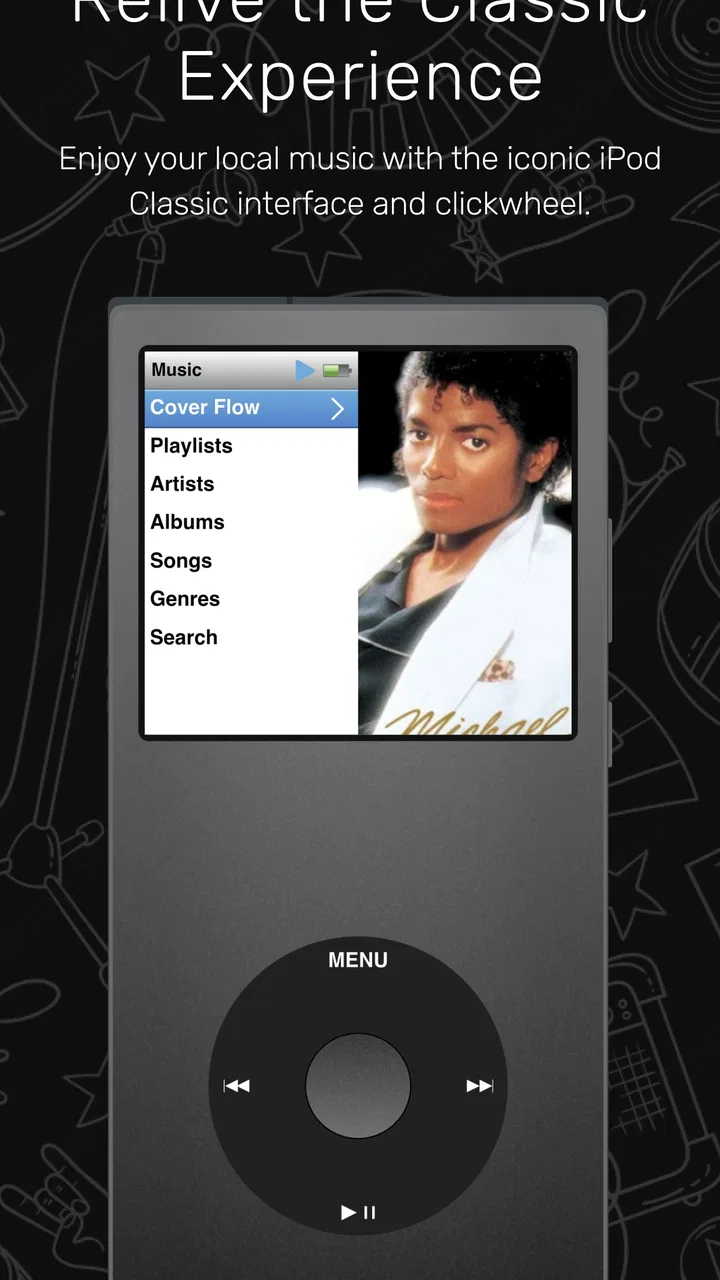
I approached ClassiPod as someone who still enjoys choosing music from a personal library instead of handing every listening decision to a streaming service. Developed by Adeeteya, this free Music & Audio app aims to recreate the feel of an iPod Classic while working with music stored locally on an Android device. That focus makes it interesting for listeners who already own audio files and want a more deliberate way to browse them.
My first impression is that its appeal depends less on having a huge feature list and more on whether its old-school approach fits your habits. It is not trying to be another streaming catalog. It is a player for the music you already have, with a visual and navigational style built around the classic iPod idea. That can feel refreshingly simple, but it also means the experience depends on the condition of your local library and how Android exposes those files.
The app is free, rated for Everyone, and supports devices running Android 7.0 or later. It was released on March 26, 2025, and the current version is 1.12.0. Its listing shows a 3.9 average from around 974 ratings, with over 100K installs. Those figures suggest a real audience, although the rating also tells me to approach it as a developing app rather than a completely polished replacement for every established music player.
You May Also Like

 AccuWeather: Weather Radar
AccuWeather Review: A Quick, Clear Forecast for Everyday Decisions
For everyday plans, the best forecast is the one you can understand quickly. AccuWeather makes rain timing, radar, and local conditions easy to act on, with a few trade-offs.

 Hill Climb Racing
Why Hill Climb Racing Still Turns Crashes Into One More Run
A tiny car, a bumpy hill and one more upgrade: Hill Climb Racing keeps resurfacing because its simple chaos makes every near-miss feel personal.

 AliExpress - Shopping App
AliExpress Makes Global Shopping Feel Personal, but Shoppers Bear the Risk
AliExpress turns a global marketplace into a pocket-sized discovery engine. Its reach is useful, its shopping loop compelling, and its trade-offs easy to miss.

 Lords Mobile: Kingdom Wars
Lords Mobile Is a Kingdom-Building Routine, Not a Quick Match
A case-by-case verdict on the building, battles, device demands, and social commitments that make Lords Mobile rewarding for some players and exhausting for others.

 PDF Scanner app - TapScanner
TapScanner Makes Paperwork Easier to Capture, Check, and Share
TapScanner makes scanning with a phone feel less like a rescue operation and more like a dependable step in getting work done. Its capture tools are useful, though not flawless.

 Block Blast!
 Shows How Much a Puzzle Game Can Leave Out
A quiet grid game shows why puzzle players increasingly value instant clarity, repeatable skill and low-pressure play—and where the genre still needs to catch up.
More From Our News Desk
View All News


Getting past the first points of friction
The most likely place a new user gets stuck is before pressing play: the music may not appear immediately, or the library may look incomplete. With a local player, that is not necessarily a playback failure. The app needs to discover files that Android makes available, and the result can be affected by where the tracks are stored, how they are named, and whether their embedded information is tidy.
I would begin with a small, known folder rather than expecting a large, messy collection to organize itself perfectly. Put a few familiar tracks in an accessible music location, open the player, and check whether those songs are visible. This simple test separates an installation problem from a library-organization problem. If the small test works, the next step is to add the rest of the collection gradually instead of changing several things at once.
File tags matter more than many people expect. A track with an incorrect artist field, a missing album name, or inconsistent capitalization can appear in a surprising place even when the audio itself is fine. If an album seems split into several entries, I would inspect the album and artist tags before blaming the player. Local music apps can only present the information attached to the files, so cleaning the library often improves the experience more than changing an app setting.
Folder names can help you stay organized, but they are not always the same thing as the labels shown inside a music player. I would treat the embedded tags as the main source of truth and use folders as a backup for finding files. This is especially useful when moving music between devices, because a folder structure may survive while inconsistent metadata becomes more noticeable in the app.
A calmer setup routine
After installing ClassiPod, I would use this order: open it once, check the visible library, test one track, then test an album or artist view. If something is missing, close and reopen the app after confirming that the files are stored locally and can be accessed by another file manager. Avoid importing an entire collection before confirming that the basic path works.
This approach also makes it easier to identify duplicate files. If the same album exists in two folders, the player may show what looks like repeated content even though it is simply seeing two copies. Removing or separating duplicates before judging the interface gives a much clearer impression of how the app handles your collection.
Android version compatibility is another practical check. ClassiPod requires Android 7.0 or later, so an older phone may not be suitable even if it still handles other audio apps. On a supported device, I would also make sure the operating system is not aggressively restricting background activity for the app. That is a general Android troubleshooting step, not a claim that every device will need it, but it can explain why playback or controls behave differently after the screen is locked.
Storage space is worth checking when copying music locally. A player cannot solve an incomplete transfer, a damaged file, or a track that exists only as an online placeholder from another service. Before troubleshooting the app, try opening the same audio file through another local method. If it fails there too, the problem belongs to the file or storage rather than the player.
Recovering a workable listening routine
One of the strongest ways to use this app is to build a focused offline collection instead of treating it as a complete replacement for a streaming account. I would start with the albums I actually replay, a few long playlists, and music needed for places where connectivity is unreliable. That keeps browsing manageable and makes the iPod-style concept feel purposeful rather than decorative.
A realistic everyday example would be a commute where I want to listen without notifications, recommendations, or network interruptions. Before leaving home, I would confirm that the chosen tracks are physically stored on the phone, open the app, and play a short section from each album I plan to hear. That quick check catches incomplete transfers while I still have access to the original files.
For travel, I would use a separate folder or carefully tagged group for the trip rather than copying an entire archive. This reduces clutter and makes it easier to find music through the app’s local browsing approach. It also creates a useful recovery point: if the larger library later becomes confusing, I still know which small collection was tested successfully.
Another non-obvious trade-off is that a local player rewards maintenance. If I regularly add downloads from different sources, I would normalize artist and album names before adding them to the phone. That small habit prevents the same performer from appearing under several slightly different labels. It is extra work compared with a streaming service, but it gives me more control over what the library looks like.
If the app appears to lose a playlist or a familiar browsing result, I would first check whether the underlying files were moved, renamed, or removed. Local references can become unreliable after reorganizing storage. Restoring the files to their previous location, or rebuilding the affected selection from the current library, is often more sensible than repeatedly reinstalling the app.
When the player is not the real problem
It is easy to blame the application when sound is missing, but several other causes are more common. I would check the phone’s media volume, Bluetooth connection, wired headset, and output device first. If audio works in another player but not here, then the comparison becomes useful; if audio fails everywhere, changing ClassiPod will not fix the phone’s output path.
A silent or skipping track may also be a damaged file or a format issue. Testing another familiar song helps isolate that quickly. If only one file fails, I would replace or re-encode that file rather than treating the entire library as broken. If every file fails, I would restart the device and retest before making more disruptive changes.
Album artwork can create a similar misunderstanding. Missing or inconsistent artwork may come from the files themselves, from how their tags were written, or from a transfer that omitted embedded images. I would not use artwork as the first test of whether the music library is working. Successful playback and sensible track information are more important indicators during setup.
Performance can also be influenced by the phone. An older device, nearly full storage, or a large number of files being processed at once can make any local library feel slow. I would give the app a smaller test collection and enough free storage before deciding that the interface is unusable. This does not guarantee a perfect result, but it produces a fairer test than opening a disorganized archive immediately after copying it.
When basic troubleshooting does not help, the safest recovery sequence is simple: stop playback, close the app, restart the phone, verify one local file in another player, and then reopen ClassiPod. If the issue is limited to a particular album, rebuild that album’s tags or replace its files. I would avoid deleting the whole music collection as a first response, because that can remove useful evidence about what went wrong.
How it compares with familiar alternatives
Compared with streaming apps, ClassiPod offers a fundamentally different relationship with music. Streaming services are better when I want instant access to a broad catalog, editorial discovery, synchronized accounts, and music that I do not own as files. They also handle much of the catalog organization for me. ClassiPod makes more sense when I already have the music and prefer not to depend on a subscription library or an internet connection.
Compared with a typical modern local audio player, its iPod Classic inspiration is the main reason to choose it. Many current players emphasize settings, equalizers, visual customization, and broad format management. ClassiPod is more appealing to someone who wants the act of browsing a personal collection to feel intentional and familiar. The trade-off is that users looking for extensive audio controls or a highly configurable interface may find a more established local player better suited to them.
It is also not the ideal choice for someone whose music lives mainly inside another service. Downloading a song for offline use within a streaming app does not necessarily create a normal local audio file that ClassiPod can browse. If your listening depends on cloud libraries, podcasts, radio stations, or automatic recommendations, a streaming-focused app will probably fit your routine more naturally.
On the other hand, listeners with carefully managed files may appreciate the independence. A personal archive can remain useful across changes in subscriptions and network coverage, and the iPod-inspired presentation gives that archive a more distinct identity than a plain file browser. I see the app as a companion to a local collection, not as a universal audio solution.
Who should use it and who should skip it
I would recommend ClassiPod to someone who owns music files, likes album-based listening, and misses the feeling of navigating a personal library without endless recommendations. It is especially suitable for a compact offline collection, a secondary phone, or a travel setup where reliable local playback matters more than access to the newest releases.
I would be more cautious about recommending it to a listener who expects every file to be automatically cleaned, identified, and presented perfectly. The app cannot repair poor metadata or incomplete transfers by itself. Anyone with a large archive should be willing to spend some time checking tags, removing duplicates, and testing a small group of tracks before committing to the full library.
I would also suggest skipping it if your priorities are advanced sound shaping, a cloud-synchronized library, or discovery features. Those needs point toward a different kind of music app. The iPod-style focus is a strength only when it matches the way you want to listen.
My practical verdict
After looking at the complete workflow, I see ClassiPod as a focused and appealing local music player rather than a replacement for every audio app on a phone. Its free price makes it easy to try, and the Everyone age rating keeps it accessible for a broad audience. The current version, 1.12.0, shows that the project is active enough to attract a meaningful audience, but the 3.9 average also encourages realistic expectations about polish and compatibility across different libraries.
The key decision is not whether you like the iPod Classic idea; it is whether your music is genuinely available as clean local files. If the answer is yes, I think the app can turn a neglected collection into something pleasant to browse. If the answer is no, the initial frustration may come from storage, tags, file access, or the limits of a local workflow rather than from the interface itself.
My advice is to begin with a handful of reliable tracks, confirm playback, organize metadata, and only then expand the library. That small setup investment reveals whether the app suits your phone and listening habits without putting your whole collection at risk. For people who want streaming discovery, deep audio controls, or automatic library management, another option will be a better match. For anyone wanting a simple, offline, iPod-inspired way to revisit music they already own, ClassiPod is worth a careful try.
FAQs for ClassiPod
01What is ClassiPod and what can I use it for?
ClassiPod is an app designed to provide access to classical music content in a convenient mobile format. After exploring its interface, users can typically browse available recordings, discover composers and works, and listen to music from their phone or tablet. It may be especially useful for students, classical-music newcomers, and listeners who want a focused alternative to general-purpose streaming platforms.
02Is ClassiPod free to download and use?
The app may be free to download, but availability of individual features can depend on its current business model, platform, region, or version. Before installing, check the official Google Play Store or Apple App Store listing for advertisements, subscriptions, in-app purchases, and any limitations on listening or offline access. Pricing and included content can change, so the store information is the most reliable source.
03Does ClassiPod work offline or require an internet connection?
ClassiPod may require an internet connection to load its catalog, artwork, descriptions, or audio streams. If the version you install supports downloads, offline listening could be limited to certain content, account types, or subscription plans. Users with restricted data plans should test the download settings and review storage requirements before relying on the app during travel or in areas with weak connectivity.
04Which devices and operating systems are compatible with ClassiPod?
Compatibility depends on the release available for Android and iOS, as well as the minimum operating-system requirements listed by the developer. Most recent smartphones and tablets should be supported, but older devices may experience installation problems, slower navigation, or playback issues. Check the official store page before downloading, particularly if your device uses an older Android or iOS version.
05Is ClassiPod safe to install and does it protect my personal information?
ClassiPod should be downloaded only from the official Google Play Store or Apple App Store to reduce the risk of modified or unsafe copies. Before creating an account, review the developer information, requested permissions, privacy policy, and data-safety disclosures. Avoid granting access that is unrelated to music playback, and keep the app updated so security fixes and compatibility improvements are applied when available.
Pros
- Simple interface makes browsing classic music easy.
- Lightweight app that uses minimal device storage.
- Quick access to playlists and recently played tracks.
- Useful search helps locate songs and artists faster.
- Suitable for users who prefer a nostalgic music experience.
Cons
- Music availability may vary by region or catalog updates.
- Some features may require a stable internet connection.
- Limited customization compared with modern music platforms.
- Audio quality options may not satisfy demanding listeners.
- The app may feel dated on newer phones or larger screens.

ClassiPod
Gallery